
WhatsApp Broadcasting
Send personalized WhatsApp messages to 100,000+ contacts at once. Smart segmentation, auto-retargeting, rich media templates, and real-time campaign analytics — with 98% open rates and zero risk of getting banned.
What is WhatsApp Broadcasting?
WhatsApp broadcasting is the ability to send a single message to a large list of contacts simultaneously through the WhatsApp Business API. Each recipient receives the message as a private, individual chat — not as a group message. They can reply directly to your business without other recipients seeing the conversation.
This is different from the "Broadcast List" feature in regular WhatsApp, which limits you to 256 contacts and requires recipients to have your number saved. The Business API version has no contact limit, does not require recipients to save your number, and supports rich media templates with images, videos, buttons, and carousels.
For businesses in India, WhatsApp broadcasting has become the primary marketing channel because of one statistic: 98% of WhatsApp messages get opened. Compare that to email (18-22% open rate), SMS (15-20% open rate for promotional messages), or push notifications (3-5% open rate). When you broadcast on WhatsApp, your message actually gets read.
Botsense provides the infrastructure to manage broadcasts at scale — template approval, audience segmentation, delivery optimization, retargeting based on read status, and detailed analytics for every campaign you send.
Why Businesses Are Moving to WhatsApp for Marketing
Email marketing open rates in India average 18-22%. That means 4 out of 5 customers never see your offer.
Promotional SMS is filtered into separate inboxes on most Android phones. Customers ignore them alongside spam.
Social media organic reach has fallen below 5% on most platforms. You are paying to reach your own followers.
Push notifications are blocked by 60% of users within the first month of installing an app.
WhatsApp messages land in the main inbox — the same place customers chat with friends and family. 98% get opened.
Rich media support means you send product images, videos, PDFs, and carousels — not plain text links.
Interactive buttons drive 45-60% click-through rates. Customers tap "Shop Now" or "Book Appointment" directly.
Two-way replies let customers respond instantly, turning a broadcast into a conversation that converts.
The Numbers Speak
Our clients consistently report 4-5X higher ROI from WhatsApp broadcasts compared to email campaigns. An e-commerce brand sending a sale announcement reaches 98% of their audience instead of 20%. A real estate firm broadcasting new property listings gets 10X more inquiries than email newsletters. A hospital sending appointment reminders via WhatsApp reduces no-shows by 40% compared to SMS reminders.
The shift is not about preference — it is about where your customers actually look. In India, that is WhatsApp. Over 500 million Indians use WhatsApp daily. Your customers are already there. Broadcasting puts your message in front of them.
Broadcasting Features That Drive Results
Bulk Messaging at Scale
Send broadcasts to 1,000, 10,000, or 100,000+ contacts in a single campaign. Botsense automatically manages Meta's sending limits and quality ratings so your number stays in good standing. New accounts start at 1,000 messages per day and scale up to unlimited within 2-3 weeks of consistent quality sending.
Unlike unofficial bulk-sending tools that risk getting your number permanently banned, Botsense operates through the official WhatsApp Business API. Every message is delivered through Meta's approved infrastructure. Your business number, green badge verification, and messaging capabilities remain protected.
Smart Audience Segmentation
Sending the same message to your entire contact list wastes money and hurts engagement. Botsense lets you segment audiences by tags, custom attributes, purchase history, engagement level, or any data field you import. Create segments like "Customers who purchased in the last 30 days" or "Leads from Delhi who haven't replied in 7 days."
After a broadcast, the platform automatically creates sub-segments: contacts who received, contacts who read, contacts who clicked, and contacts who replied. Use these engagement-based segments for follow-up campaigns. Send a different offer to people who opened but didn't click. Send a reminder to those who didn't open at all. This layered approach consistently improves conversion rates by 25-40% compared to one-shot blasts.
Rich Media Templates
WhatsApp broadcasts support far more than plain text. Attach product images, promotional videos, PDF catalogs, or document files to any broadcast. Use carousel templates to display up to 10 products in a swipeable format — each card with its own image, description, and call-to-action button.
Add interactive elements: quick-reply buttons for instant responses ("Interested" / "Not now"), call-to-action buttons that open a URL or initiate a phone call, and list messages that present multiple options in a clean format. For e-commerce businesses, this means sending a "New Arrivals" broadcast where each product is a tappable card that leads directly to the checkout page.
Real-Time Campaign Analytics
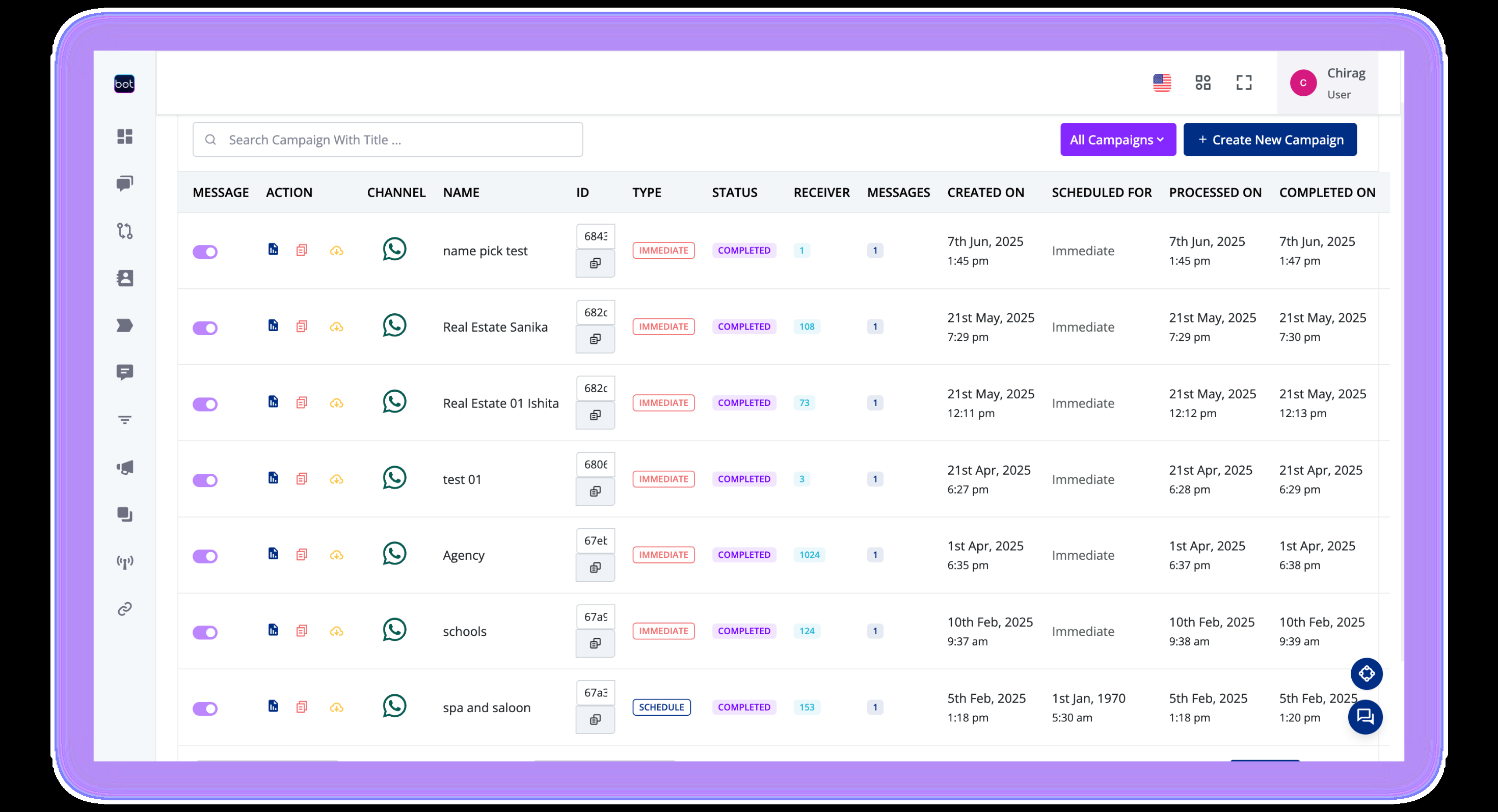
Every broadcast generates detailed analytics in real-time: total sent, delivered, read, clicked, replied, and failed — all visible in your Botsense dashboard as the campaign runs. No waiting for next-day reports.
Compare campaign performance side by side. Identify which message copy drives more clicks. Find the optimal sending time for your audience. Track conversions from broadcast to purchase by connecting your CRM through n8n automation. Export campaign reports as CSV for your marketing team or management presentations.
Auto-Retargeting Campaigns
The first message doesn't always convert. Botsense's retargeting engine automatically creates follow-up audiences based on how contacts interacted with your broadcast. Opened but didn't click? Send a different offer 24 hours later. Clicked but didn't purchase? Send a limited-time discount the next day.
This automated retargeting flow recovers 15-30% of initially unresponsive contacts. For a broadcast reaching 10,000 people, that translates to 1,500-3,000 additional engaged contacts from the same campaign — without manually creating new lists or scheduling follow-ups. Set the rules once and Botsense handles the rest.
Scheduling and Drip Sequences
Schedule broadcasts for any date and time. Plan your entire week's campaigns on Monday morning and let them send automatically. Time your messages for when your audience is most active — our data shows 10 AM and 7 PM IST consistently outperform other slots for marketing messages.
Build drip sequences that send multiple messages over days or weeks. A typical product launch sequence: Day 1 teaser, Day 3 product reveal with video, Day 5 early-bird offer, Day 7 last-chance reminder. Each message in the sequence can be conditional — skip the reminder if the customer already purchased.
Template Approval Management
Every WhatsApp broadcast requires a pre-approved message template. Botsense manages the entire template lifecycle: creation, submission to Meta for review, tracking approval status, and organizing approved templates for quick reuse.
Our team pre-reviews templates before submission, catching policy violations that would cause rejections. We maintain a 95%+ first-submission approval rate. Templates typically get approved within 24 hours. Need a template for a flash sale starting tomorrow? Submit it today and it is ready by morning.
Dynamic Personalization
Generic "Dear Customer" messages get ignored. Botsense supports dynamic variables in every template — insert the customer's name, their last purchase, their city, their pending order status, or any custom field from your contact database. "Hi Priya, your favorite shampoo is back in stock" performs dramatically better than "Dear Customer, product restocked."
Personalization extends beyond text. Use conditional content blocks to show different product images based on customer segments. A clothing brand can broadcast "New Arrivals" where men see menswear and women see womenswear — same campaign, personalized experience.
WhatsApp vs Email vs SMS: The Comparison
Here is how WhatsApp broadcasting stacks up against traditional marketing channels for Indian businesses.
| Feature | WhatsApp Broadcasting | Email Marketing | SMS Marketing |
|---|---|---|---|
| Open Rate | 98% | 18-22% | 15-20% (promo) |
| Click-Through Rate | 45-60% | 2-5% | 3-6% |
| Rich Media | Images, video, PDF, carousels | Images (often blocked) | Plain text only |
| Interactive Buttons | Yes (CTA + quick reply) | Clickable links | No |
| Two-Way Replies | Instant in-chat replies | Email reply (slow) | No |
| Read Receipts | Yes | Pixel-based (unreliable) | Delivery only |
| Personalization | Dynamic variables + media | Merge tags | Limited |
| Cost per 10K messages | ~₹5,000-7,800 | ~₹500-1,000 | ~₹1,000-1,500 |
| ROI (avg.) | 4-5X | 1.5-2X | 1-1.5X |
WhatsApp costs more per message than email or SMS. But the cost-per-conversion tells a different story. When 98% of recipients open your message and 45%+ click through, your effective cost per lead or sale is significantly lower than channels where 80% of messages go unseen. For most Indian businesses, the ROI math strongly favors WhatsApp broadcasting for promotional campaigns.
Broadcasting Use Cases by Industry
Every industry uses WhatsApp broadcasts differently. Here is how businesses across sectors leverage bulk messaging to drive revenue and engagement.
E-commerce and D2C Brands
Online stores use WhatsApp broadcasts for sale announcements, new product launches, restocking alerts, and abandoned cart recovery. A typical Diwali sale campaign reaches 50,000+ contacts with a carousel showing top deals, each with a "Shop Now" button linking directly to the product page. Our e-commerce clients report 15-25% conversion rates on sale broadcasts — compared to 2-3% from email.
Post-purchase broadcasts drive repeat sales: "Your order was delivered! Here are 3 products that pair well with your purchase." Timed 7 days after delivery, these cross-sell broadcasts generate 8-12% additional revenue from existing customers.
Education and EdTech
Educational institutions broadcast admission announcements, exam schedules, fee reminders, and event invitations. A coaching institute broadcasting "New Batch Starting Monday — 5 Seats Left" with a registration button converts 3-4X more students than the same announcement via email or website banner.
EdTech companies use broadcasts for webinar invitations, course launch announcements, and student engagement. Send a video teaser of your upcoming course with a "Register Now" button. Follow up with a reminder 24 hours before the session. Post-session, broadcast the recording with a "Join Full Course" offer. This sequence consistently fills batches faster than any other channel.
Healthcare and Clinics
Hospitals and clinics broadcast appointment reminders, health camp announcements, vaccination schedules, and seasonal health tips. A multi-specialty hospital broadcasting "Free Health Checkup This Saturday" to their patient database of 25,000 contacts fills appointment slots within hours.
Ongoing patient engagement through health tip broadcasts builds trust and keeps your clinic top-of-mind. A dental clinic sending monthly oral health tips with a "Book Cleaning" button maintains a steady flow of appointments without expensive advertising.
Real Estate
Real estate developers and brokers broadcast new property launches, price updates, construction milestones, and site visit invitations. A builder launching a new project sends a carousel broadcast with floor plans, amenities, and pricing to their 15,000-contact database. Within 48 hours, they have 200+ site visit requests — leads that would take weeks to generate through newspaper ads or portals.
Post-launch follow-ups target specific segments: broadcast construction progress photos to interested leads, send payment reminder to booked customers, share referral offers to existing buyers. Each communication strengthens the buyer relationship and accelerates the sales cycle.
Events and Hospitality
Event organizers use broadcasts for ticket sale announcements, early-bird offers, event day logistics, and post-event feedback. A conference organizer broadcasting "Last 50 Tickets — Book Now" with a direct payment link sees 3-5X higher urgency response than email countdowns.
Hotels and restaurants broadcast seasonal menus, weekend brunch offers, festive packages, and loyalty rewards. A restaurant chain broadcasting a "Diwali Special Menu" carousel with each dish as a card (image + price + "Reserve Table" button) fills reservations within days.
How to Send a WhatsApp Broadcast
From setup to your first campaign, broadcasting on WhatsApp takes less than a day.
Import Your Contacts
Upload your contact list via CSV, connect your CRM through our API, or sync from Google Sheets. Tag contacts during import for easy segmentation later. Botsense deduplicates numbers and validates formats automatically.
Create and Approve Templates
Write your message using our template editor. Add images, videos, buttons, and personalization variables. Botsense reviews the template for Meta compliance and submits it for approval. Most templates are approved within 24 hours.
Segment Your Audience
Select which contacts receive the broadcast. Filter by tags, attributes, engagement history, or custom fields. Create saved segments for recurring campaigns like "All Delhi Customers" or "Purchased in Last 30 Days."
Send or Schedule
Broadcast immediately or schedule for a specific date and time. Set up follow-up sequences with automatic retargeting rules. Preview the message on a test number before sending to your full list.
Track Results and Retarget
Monitor delivery, read, and click metrics in real-time. Use auto-generated engagement segments to send follow-up campaigns to contacts who opened but did not respond, or who clicked but did not convert.
WhatsApp Broadcasting Best Practices
Get explicit opt-in. Do not broadcast to contacts who did not consent. Use a WhatsApp opt-in widget on your website, a keyword-based opt-in ("Send HI to start"), or collect consent during purchase checkout. Opt-in is not just a legal requirement — it directly impacts your quality rating and sending limits.
Limit broadcast frequency. Sending daily promotional broadcasts leads to blocks and opt-outs. For most businesses, 2-3 broadcasts per week is the sweet spot. Transactional messages (order updates, appointment reminders) can be sent as needed without frequency concerns.
Personalize beyond the name. "Hi {name}" is the bare minimum. Reference the customer's last purchase, their location, or their browsing behavior. Personalized broadcasts see 30-40% higher engagement than generic ones.
Include a clear call-to-action. Every broadcast should have one primary action: shop now, book appointment, register, claim offer. Do not clutter messages with multiple competing CTAs. One button, one action, one conversion path.
Time it right. Avoid early mornings and late nights. Our data across 300+ businesses shows peak engagement between 10-11 AM and 7-8 PM IST. Test different slots for your specific audience and stick with what works.
Always provide an opt-out. Include "Reply STOP to unsubscribe" in your templates. Prompt opt-outs are better than blocks. A customer who opts out can be re-engaged later; a customer who blocks you is lost permanently.
Broadcasting Pricing
All plans include unlimited broadcasts, template management, segmentation, analytics, and a dedicated account manager.
+ Meta conversation charges
- Unlimited broadcasts
- Contact management + CSV import
- Basic segmentation (tags)
- Campaign analytics dashboard
- Template approval assistance
- Email + chat support
+ Meta conversation charges
- Everything in Starter
- Smart segmentation + retargeting
- Drip campaign sequences
- CRM integration via API
- n8n workflow automation
- Dedicated account manager
- Priority support
Volume-based pricing
- Everything in Growth
- Multiple WhatsApp numbers
- Custom integrations
- Dedicated infrastructure
- SLA guarantees
- On-call support
All plans include green badge verification, shared team inbox, and Click-to-WhatsApp Ads support. See full pricing details.
Frequently Asked Questions
What is WhatsApp broadcasting and how does it work?
Is WhatsApp broadcasting legal in India?
How many messages can I send in a single broadcast?
What is the difference between WhatsApp broadcasting and WhatsApp groups?
How much does WhatsApp broadcasting cost?
Can I send images, videos, and buttons in broadcasts?
What happens if my message template gets rejected?
Start Broadcasting Today
Join 300+ Indian businesses sending millions of WhatsApp messages with Botsense. Start your free trial — no credit card required. Your first broadcast can go out today.